How to trigger custom email notifications from a data fetch

I've been working on a project lately that involves pulling contracts from the US government's SAM contract system and writing them to a cloud storage bucket for bulk analysis later.
Then I made an add-on module that sends me an email with a list of all of the contracts each day, and realized that this is just as useful as the long-term storage.
Since email is still the bedrock of how a lot of work tasks are assigned or delegated, it fits into my workflow in a way that's easy to incorporate: I can read it immediately, save it for later, archive it, forward it to other team members, or just delete it.
I've been meaning to document it for a while, but didn't get around to it until reading Scott Klein and Ben Walsh's recent article on how data journalism lost its culture of sharing.
The chart below from Klein and Walsh's analysis tells a large part of the story:
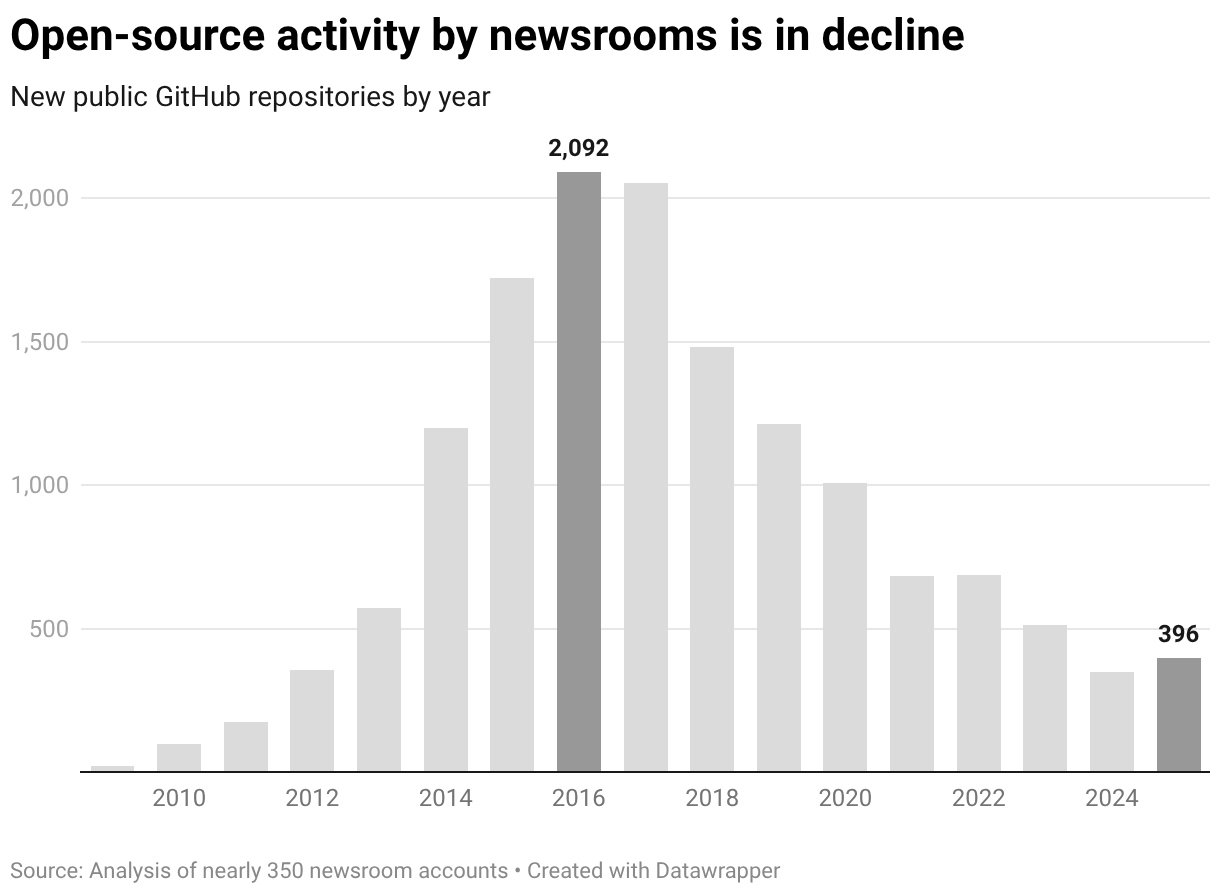
When I was making my first forays into using code for data analysis, the culture was very open; now, it's much more closed. If I was starting from scratch today, I wonder how different the path would be?
To cut a long story short, thinking about this has pushed me to try harder to document things and release them openly. The full pipeline for the SAM contract system has a lot of moving parts, so rather than try to describe all of them, I made a demo repo that shows the logic of the email notification system in isolation.
It's now online here: github.com/corintxt/api-to-email-demo
And here's a rundown of a few key points.
Architecture
The demo version of the application is split into three scripts, each with a single area of responsibility:
- main.py is the orchestrator: it loads configuration, calls the other two modules in sequence, and handles errors.
- fetcher.py talks to the API we're using, in this case CoinDesk. It sends a request, gets back JSON with current cryptocurrency prices, and processes that data into a clean format.
- notifier.py takes that processed data and sends it as an HTML email through Mailgun.
That's the whole structure. If you wanted to swap out the data source — say, weather data instead of crypto prices — you could rewrite fetcher.py and leave everything else more or less untouched. If you wanted to send a Slack message instead of an email, you could swap out or adapt notifier.py. And our orchestrator doesn't need to know where the data comes from or where it goes, it just moves it to the right places in the right order.
Data flow
I chose the CoinDesk API for the demo because it doesn't require any authentication to use. We can hit it with a request for different trading pairs, like BTC-USD or ETH-USD, and get back a JSON response with lots of different data points: timestamp, current price, weekly trading volume, all-time high and low, and many other things.
The raw response is more complex than what we need, so a processing function strips it down to a few essentials: symbol, price, price direction (UP/DOWN), and time. That processed data gets passed back to the orchestrator by fetcher.py as a list of dictionaries, one for each currency pair.
The orchestrator then passes this list to notifier.py, which has a function send_email_notification() that takes as arguments the crypto data and a few other things it needs for Mailgun to work, like the API key and recipient's email address.
It also includes a function to generate a formatted HTML table for the email, which is not strictly necessary but looks nicer than plain text.
Using Mailgun
A quick note about Mailgun, which I only discovered recently and like a lot.
Mailgun is an email delivery service that can be triggered programatically: you send it an API request with some message content, and it takes care of getting that message into someone's inbox.
The interaction is an HTTP POST request to Mailgun's REST API, with an API key for authentication and the email content in the request body. From the code's perspective, sending an email is just like calling any other web API.
Here's an example adapted from Mailgun's blog:
def send_single_email(to_address: str,
                     subject: str,
                     message: str):
    try:
        api_key = os.getenv("MAILGUN_API_KEY")

        resp = requests.post(MAILGUN_API_URL, auth=("api", api_key),
                             data={"from": FROM_EMAIL_ADDRESS,
                                   "to": to_address,
                                   "subject": subject,
                                   "text": message})
        if resp.status_code == 200:  # success
            logging.info(f"Sent an email to '{to_address}'.")
        else:  # error
            logging.error(f"Error: {resp.text}")

    except Exception as ex:
        logging.exception(f"Mailgun error: {ex}")

if __name__ == "__main__":
    send_single_email("Person <name@example.com>",
    "Single email test",
    "Testing Mailgun API for a single email")
Our project is pretty similar: the notifier constructs an HTML email body, sets the sender and recipient addresses, and makes a single requests.post() call. If the response comes back with a 200 status code, the email was accepted for delivery. Excluding the HTML formatting part, this requires about 25 lines of code.
Configuration
Everything is driven by environment variables loaded from a .env file. You can specify which cryptocurrencies to track, and then need to include Mailgun credentials and the recipient email address. This keeps secrets out of the codebase, and makes the application easy to configure in different environments.
Speaking of which, the repo includes notes on how to deploy to Railway with a Cron schedule, which would be a simple way to run this in the cloud on a daily basis or however often you like.
This is meant to be a minimal project, but it's also meant to show that a data pipeline that can bring value to users (I'm thinking particularly of journalists here) doesn't have to require significant code or infrastructure. There are three files, two common external dependencies (requests and python-dotenv), and a free-tier email service. You can read through all of the scripts in a few minutes and see clearly what the different functions do.
You could also take the same basic pattern — fetch, process, deliver — and apply it to almost anything: stocks, traffic alerts, asteroid tracking, or anything else with an accessible data source.
I'm planning to use this much more myself, but if you are reading this and find any of it useful, please let me know!
© Corin Faife.RSS